
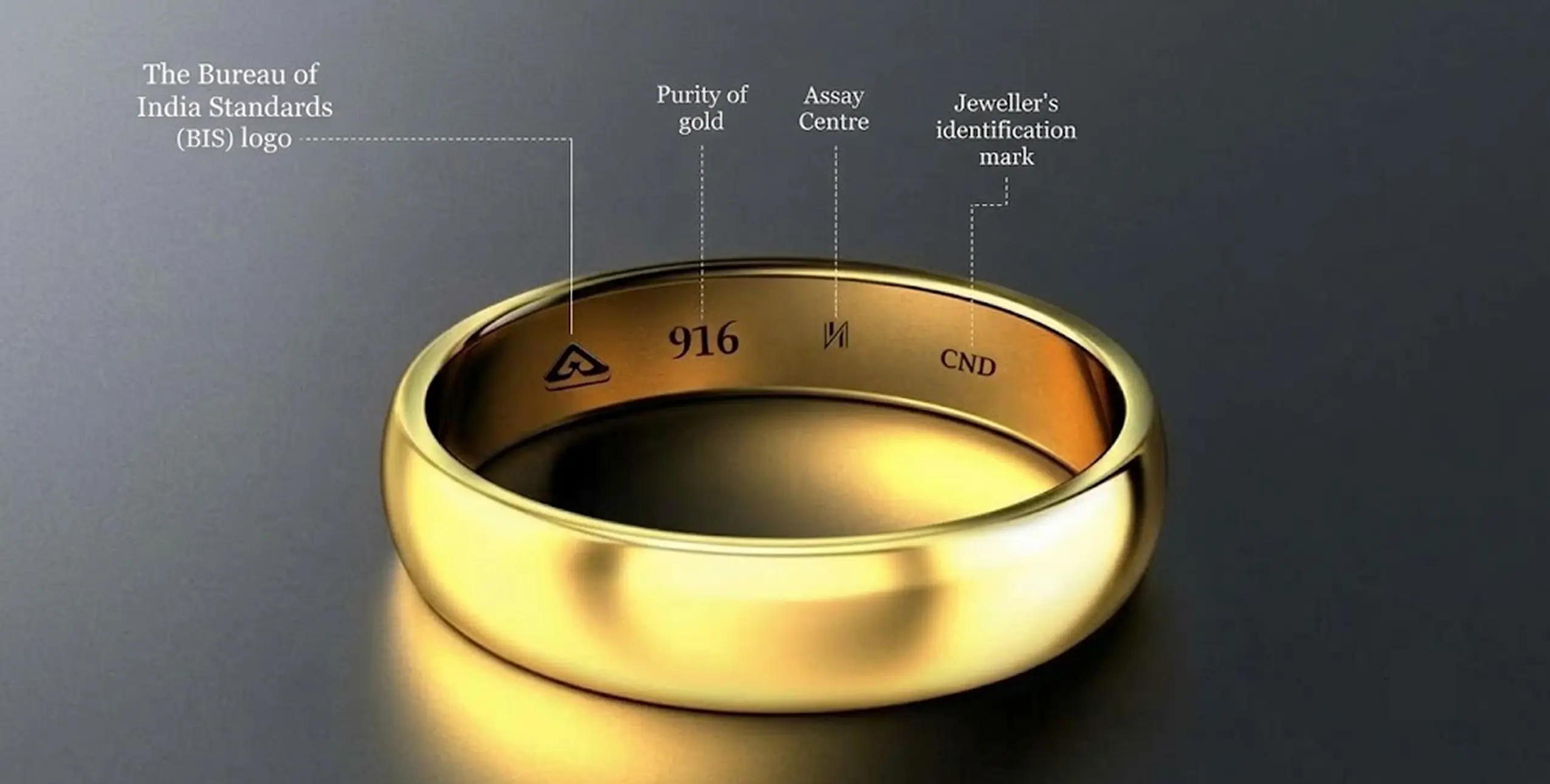
Managing HUID hallmarking compliance is an important part of running a jewellery business in India. From recording HUIDs when stock arrives to including them on customer invoices, every step requires accurate records.
Managing these tasks manually can lead to missing entries, billing errors, and inventory discrepancies. These problems become harder to manage when you handle hundreds of jewellery pieces or operate multiple showrooms.
Jewellery ERP software can help simplify this process by connecting HUID records with inventory, billing, stock transfers, and returns.
In this guide, we’ll explain what HUID is, what jewellers need to manage, and how J-Soft ERP can help streamline HUID management.
What Is HUID Hallmarking?
HUID stands for Hallmark Unique Identification. It is a six-character alphanumeric code assigned to an individual piece of hallmarked gold jewellery through the applicable hallmarking process.
The HUID system helps make hallmarked jewellery traceable and allows customers to verify hallmarking details through the BIS CARE app.
HUID plays an important role in jewellery retail because it helps businesses maintain item-level records and supports greater transparency during sales and inventory checks.
For jewellers, effective HUID management involves more than recording a code. The code must remain linked to the correct jewellery item throughout its inventory lifecycle.
What Does HUID Compliance Involve?
Jewellers need a reliable process for recording and tracking HUIDs across everyday business operations.
Here are the key areas to manage.
1. Stock Inward
Record the HUID of each applicable hallmarked jewellery item when receiving stock from a supplier or manufacturer. Link the code to the correct item in your inventory records.
2. Customer Billing
Ensure the relevant HUID is included on the customer invoice wherever required. Accurate item-level records help reduce manual entry errors during billing.
3. Stock Audits
Reconcile physical jewellery with inventory records. Each applicable HUID should correspond to the correct item, helping staff identify missing entries or stock discrepancies.
4. Returns and Exchanges
Update inventory records whenever jewellery is returned, exchanged, or received as old gold. Maintain a clear transaction history so that the item’s status can be traced.
5. Melting and Redesign
Record the movement and disposition of jewellery sent for melting, modification, or job work. Update the item’s inventory status and retain the relevant records.
Handling these activities through registers or spreadsheets may work for a small inventory. As stock volumes increase, however, manual tracking becomes more time-consuming and makes errors harder to identify.
A jewellery ERP system can bring these processes together in one place.
How J-Soft ERP Helps Manage HUID
J-Soft ERP helps jewellery businesses manage HUID-related inventory and billing activities through a connected workflow.
1. Record HUIDs When Receiving Stock
When hallmarked jewellery arrives at your showroom, your team can record the applicable HUID during goods receipt.
The HUID can be linked to the item’s inventory details, such as weight, purity, category, and value. This makes it easier to identify individual pieces and maintain accurate stock records.
Capturing information at the point of receipt also reduces the risk of leaving inventory entries incomplete and updating them later.
2. Track HUIDs Throughout Inventory
Once recorded, HUID information can help staff locate and track individual jewellery pieces.
Instead of searching through multiple registers, staff can use inventory records to identify an item and review its associated details.
For businesses with multiple showrooms, J-Soft Cloud ERP supports centralized inventory visibility. This helps management monitor stock across branches and maintain records of inter-branch transfers.
Accurate item-level tracking also supports stock audits by making it easier to compare system records with physical inventory.
3. Include HUID on Customer Invoices
During billing, the relevant HUID should be associated with the jewellery item being sold and included on the invoice as required.
J-Soft ERP’s HUID-related billing workflow helps reduce dependence on manual entry by linking inventory information with the sales process.
A properly configured invoice can include relevant details such as the item description, weight, purity, HUID, applicable charges, taxes, and total amount.
This is particularly useful during busy sales periods, when billing staff need to process transactions quickly without overlooking important item details.
4. Maintain Records of Sold Jewellery
When a jewellery item is sold, its inventory status should be updated to reflect the transaction.
Maintaining a link between the item’s HUID, sales record, and invoice makes it easier to review past transactions and respond to customer queries.
It also helps staff identify items that should no longer appear as available stock.
5. Manage Returns, Exchanges, and Job Work
Jewellery inventory changes throughout the business cycle. A reliable process should account for returned items, old-gold exchanges, melting, and redesign.
Customer returns: Update the item’s status when returned jewellery is accepted back into inventory. Retain the original item details and return transaction records.
Old-gold exchanges: Record the details of jewellery received during an exchange and maintain the relevant transaction documentation.
Melting and redesign: Record the item’s movement to job work or melting, and update its inventory status according to the actual outcome and applicable procedures.
These records help businesses maintain a clearer view of available stock and reduce discrepancies between physical inventory and system records.
For more information, read Managing Karigar (Job Work) Accounts with Jewellery ERP Software.
Managing HUID Across Multiple Jewellery Showrooms
Managing HUID records becomes more complex when a business operates several branches.
Stock may move between showrooms, branch managers may maintain separate records, and management may need to review inventory across locations. Without a connected system, compiling this information can take considerable time.
J-Soft Cloud ERP helps businesses manage multi-branch inventory through a centralized system.
Depending on the configured workflow, businesses can use the system to:
- View inventory information across branches.
- Maintain records of inter-branch stock transfers.
- Monitor branch-wise inventory.
- Support stock audits and reconciliation.
- Review inventory and transaction information centrally.
Centralized inventory management gives business owners and managers better visibility into stock movements without relying entirely on separate spreadsheets or manually compiled reports.
Common HUID Management Mistakes and How to Avoid Them
Even with established procedures, gaps can occur when HUID information is not updated consistently.
Here are four common mistakes and practical ways to prevent them.
1. Recording HUIDs After Receiving Stock
The problem: Staff receive and display jewellery before completing its inventory records.
How to avoid it: Make HUID recording part of the stock-receiving process. Verify the relevant item details before completing the inventory entry.
2. Missing HUID Information on Invoices
The problem: Billing software may not support the required HUID field, or staff may overlook it during billing.
How to avoid it: Configure invoice templates appropriately and test the billing workflow to ensure the required information appears correctly.
3. Failing to Update Returned Jewellery
The problem: Returned jewellery may be physically present in the showroom while its system status remains incorrect.
How to avoid it: Update inventory only after the return has been checked and accepted. Retain the original item details and document the transaction.
4. Leaving Melted or Redesigned Items in Active Stock
The problem: Inventory records may continue to show an item as available even after it has been sent for melting or modification.
How to avoid it: Record the movement, update the item’s status according to the actual outcome, and retain the relevant job-work or disposition records.
A consistent process, supported by appropriate ERP controls, helps reduce these errors and makes inventory reconciliation easier.
HUID Reports for Inventory Control and Audits
Reports help jewellery businesses review HUID records without manually compiling information from multiple sources.
Depending on the software configuration, useful reports may include:
| Report | Purpose |
|---|---|
| HUID Stock Report | Review HUID-tagged inventory, including item details and location |
| HUID Sales Report | Review sold items and their associated sales records |
| HUID Audit Report | Compare system inventory with physical stock records |
| HUID Transfer Report | Review movements of jewellery between branches |
| HUID Retirement Report | Review records for items removed from active stock following melting or other applicable disposition |
These reports can support internal stock control, reconciliation, and the preparation of relevant records for inspection.
For businesses using J-Soft ERP, report availability and content should be confirmed against the features enabled in their specific setup.
Frequently Asked Questions
1. Is HUID mandatory for gold jewellery in India?
HUID hallmarking requirements depend on the applicable BIS regulations, product category, and any relevant exemptions or transition provisions. Jewellers should refer to the Bureau of Indian Standards for current requirements.
2. How can customers verify a HUID?
Customers can use the BIS CARE app to check applicable hallmarking information. They should follow the app’s current instructions and verify the details displayed for the jewellery item.
3. How should jewellers manage jewellery received before HUID requirements applied?
Jewellers should identify applicable legacy stock and follow the relevant BIS transition provisions. Maintain clear inventory records and avoid treating older stock as compliant without verifying the requirements that apply to it.
4. Can jewellery ERP software help manage HUID across multiple showrooms?
Yes. A suitably configured multi-branch jewellery ERP can centralize inventory records, help track stock movements, and support branch-wise reconciliation. The available features depend on the specific software and configuration.
5. Does HUID apply to silver jewellery?
Gold and silver hallmarking requirements are not identical. Jewellers should check the latest BIS guidance for the relevant metal, product category, and hallmarking requirements.
6. What should jewellers maintain for an HUID-related inspection?
Maintain accurate inventory records, relevant invoices, stock movement documentation, and records of returns or other inventory changes. The exact requirements depend on the applicable regulations and circumstances of the inspection.
Conclusion
Simplify Jewellery Inventory Management with J-Soft ERP
Managing HUID information involves several connected activities, from receiving stock and billing customers to handling returns and conducting stock audits.
When these activities rely heavily on manual records, it becomes harder to maintain consistency as the business grows.
J-Soft ERP helps jewellery businesses organize inventory and billing workflows, maintain item-level information, and manage stock across showrooms. These capabilities can help teams reduce repetitive data entry and improve visibility into daily operations.
If you want to simplify your jewellery business operations, explore J-Soft ERP’s retail management solutions.
Book a Free Demo of J-Soft ERP to discuss your inventory, billing, and multi-branch management requirements.